

We all know and use GitHub Copilot. It’s been a staple in VS Code for a while, connecting us to various LLMs to speed up our workflow. But the latest update just dropped something the community has been eagerly waiting for: a fully autonomous agent mode.
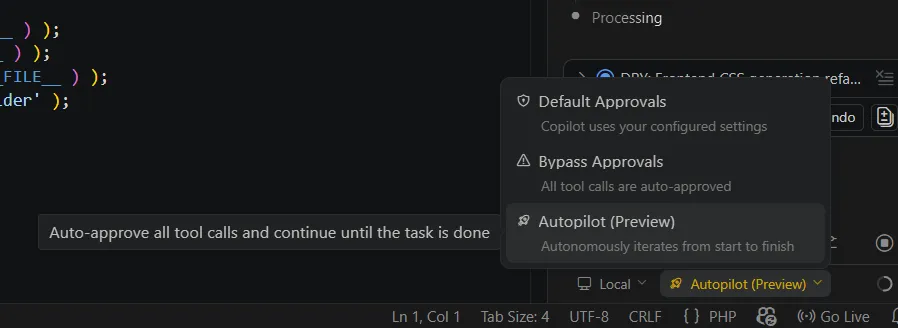
Dubbed Autopilot (currently in Preview), this new feature fundamentally changes how we interact with the IDE. Instead of the traditional back-and-forth prompting for every single function, Autopilot handles end-to-end code implementation based on a single initial prompt.
How Autopilot Changes the Game
Before this update, coding with AI meant dealing with dozens of micro-interruptions. You’d ask for a function, wait, paste it, fix a bug, and prompt again.
With Autopilot engaged, the process becomes entirely hands-off. Once you give it a directive, the agent takes over to:
- Organize and create its own task list.
- Implement the code structure.
- Execute necessary terminal commands.
- Verify and debug its own errors.
- Deliver the final, working result.
My Real-World Test (Claude Opus 4.6)
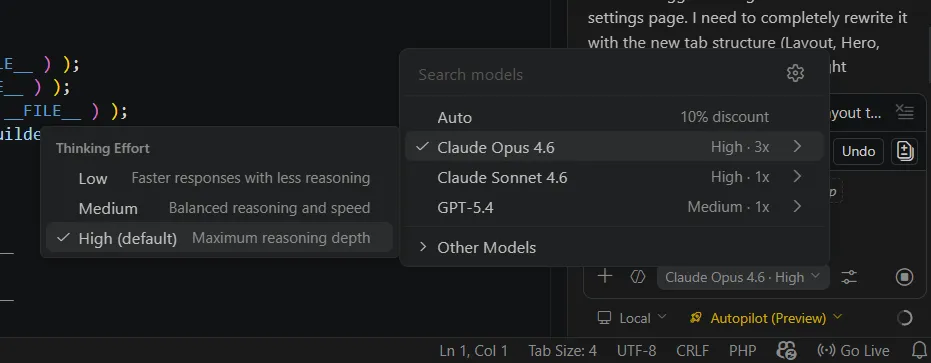
I decided to put Autopilot to the test in a real-world scenario inside VS Code, specifically on a custom WordPress plugin I’m currently developing.
I set up the planning mode, toggled Autopilot on, and let the magic happen. For this run, I routed it through Claude Opus 4.6 with the “Thinking” parameter set to High. The precision of the entire code generation process was nothing short of excellent.
The Dawn of True Agentic Workflows
Watching this unfold makes it clear that we are stepping into a new era of AI capabilities. We are moving past glorified autocomplete and entering the territory of relentless, goal-oriented agents.
If Autopilot encounters an error, it doesn’t just stop and wait for your input, it attempts to troubleshoot it. If a dependency is missing, it adds it. It iterates continuously until the primary objective is met. It brings that same fascinating autonomous problem-solving energy that you get when running frameworks like OpenClaw, but right inside your everyday editor.
It is undeniably fascinating, yet it still gives you that slight knot in your stomach. It’s a bit daunting to watch AI advance to a point where writing a single line of code manually is starting to feel strictly optional.
